Service Accounts
The basic unit in Kubernetes is a Pod. Pods runs inside a namespace. Every namespace have a default service account.
Why we need service account?
If your workload needs to access the Kubernetes API, then we need a mechanism to authenticate and authorize the request. Here we can use the service account and assign permissions to it.
This service account can then be used inside a Pod.
Every namespace have a default service account.
ubuntu@cks-master:~$ kubectl get sa
NAME      SECRETS   AGE
default   0         4d19h
ubuntu@cks-master:~$
Service account
kubectl create -f - <<EOF
apiVersion: v1
kind: ServiceAccount
metadata:
  name: mysvcacc
  namespace: default
EOF
Create a Pod and use this service account to contact the API
kubectl create -f - <<EOF
apiVersion: v1
kind: Pod
metadata:
  creationTimestamp: null
  labels:
    run: api-test
  name: api-test
spec:
  serviceAccountName: mysvcacc
  containers:
  - image: nginx
    name: api-test
EOF
The authentication using service account happens via a signed JWT token which gets mounted inside the Pod.
View token
kubectl exec -it api-test -- cat /run/secrets/kubernetes.io/serviceaccount/token && echoYou can visit the https://jwt.io/ to and paste the token to see the details.
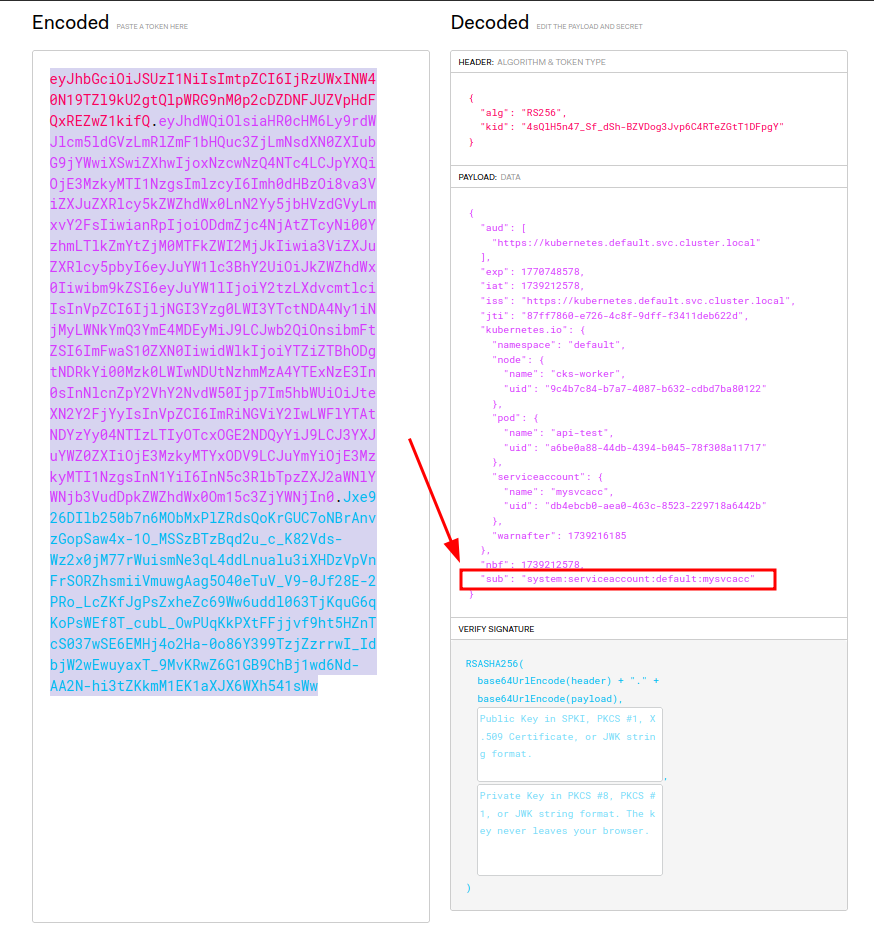
As the screenshot shows, the API service can indentify the token and handle authorization using the “sub” field.
You can control the token mount behavior using below flag.
FIELD: automountServiceAccountToken <boolean>


DESCRIPTION:
    AutomountServiceAccountToken indicates whether pods running as this service
    account should have an API token automatically mounted. Can be overridden at
    the pod level.
In which scenario you need to set automountServiceAccountToken to false.
The scenario which your workload don’t have to contact API, but need a service account.
Yes, you can use service account for another scenario where you need an imagePullSecret to pull container images.
Using imagePullSecter in ServiceAccount
kubectl create secret docker-registry myregistrykey --docker-server=<registry name> \
        --docker-username=DUMMY_USERNAME --docker-password=DUMMY_DOCKER_PASSWORD \
        --docker-email=DUMMY_DOCKER_EMAIL
kubectl patch serviceaccount mysvcacc -p '{"imagePullSecrets": [{"name": "myregistrykey"}]}'apiVersion: v1
kind: ServiceAccount
metadata:
creationTimestamp: 2021-07-07T22:02:39Z
name: mysvcacc
namespace: default
uid: 052fb0f4-3d50-11e5-b066-42010af0d7b6
imagePullSecrets:
- name: myregistrykeyAccessing API from Pod
curl -k https://${KUBERNETES_SERVICE_HOST}/api -H "Authorization: Bearer $(cat /run/secrets/kubernetes.io/serviceaccount/token)"{
"kind": "APIVersions",
"versions": [
"v1"
],
"serverAddressByClientCIDRs": [
{
"clientCIDR": "0.0.0.0/0",
"serverAddress": "192.168.0.175:6443"
}
]
}