Chapter 2
Lab Setup
Cluster Setup
In this session, we will explore how to setup a Kubernetes cluster with one master and one worker using VirtualBox
Pre-requisites
- Linux Desktop with Internet
- VirtualBox
In this session, we will explore how to setup a Kubernetes cluster with one master and one worker using VirtualBox
In this chapter, we will import Ubuntu 24.04 OVA appliance to VirtualBox and will set it up.
cd ~/Downloads/
curl -LO https://cloud-images.ubuntu.com/noble/current/noble-server-cloudimg-amd64.ova
Create a seed iso which is needed for setting initial password and login
ssh-keygen -t ed25519 -C "${USER}@{HOSTNAME}"sudo apt install cloud-utilscat <<EOF > my-cloud-config.yaml
#cloud-config
chpasswd:
list: |
ubuntu:ubuntu
expire: False
ssh_pwauth: True
ssh_authorized_keys:
- $(cat ${HOME}/.ssh/id_ed25519.pub)
EOFcloud-localds my-seed.iso my-cloud-config.yamlImport OVA
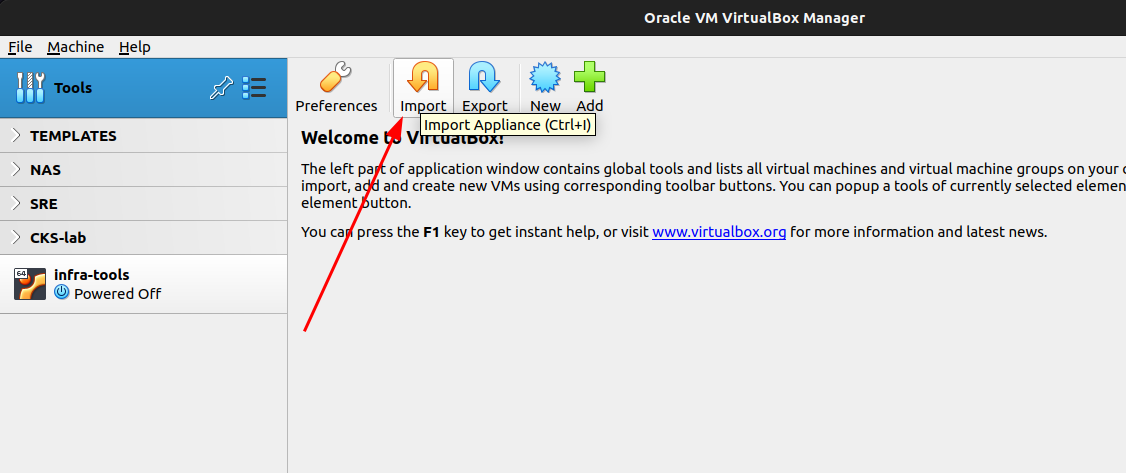
From the welcome page, click “Import”
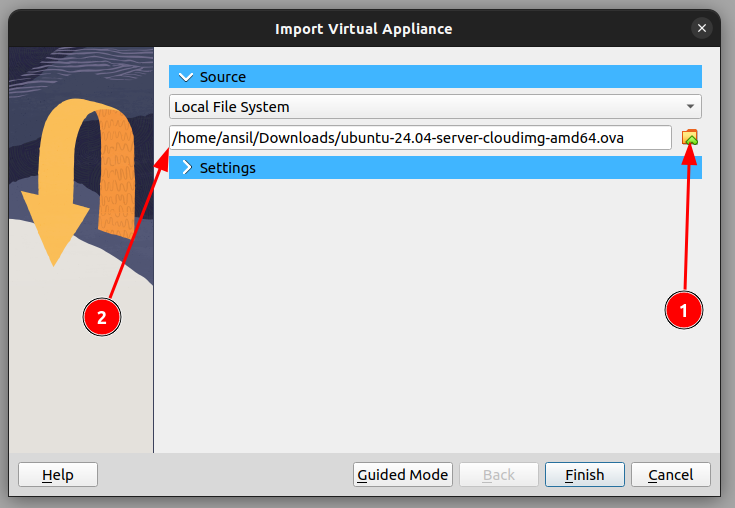
Select the OVA as source
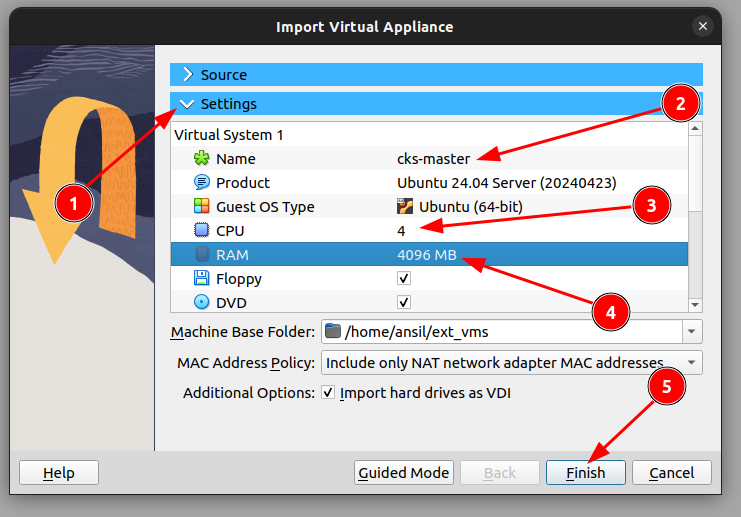
- Click Settings
- Change name
- Increase CPU to 4
- Increase RAM to 4GB
- Click Finish
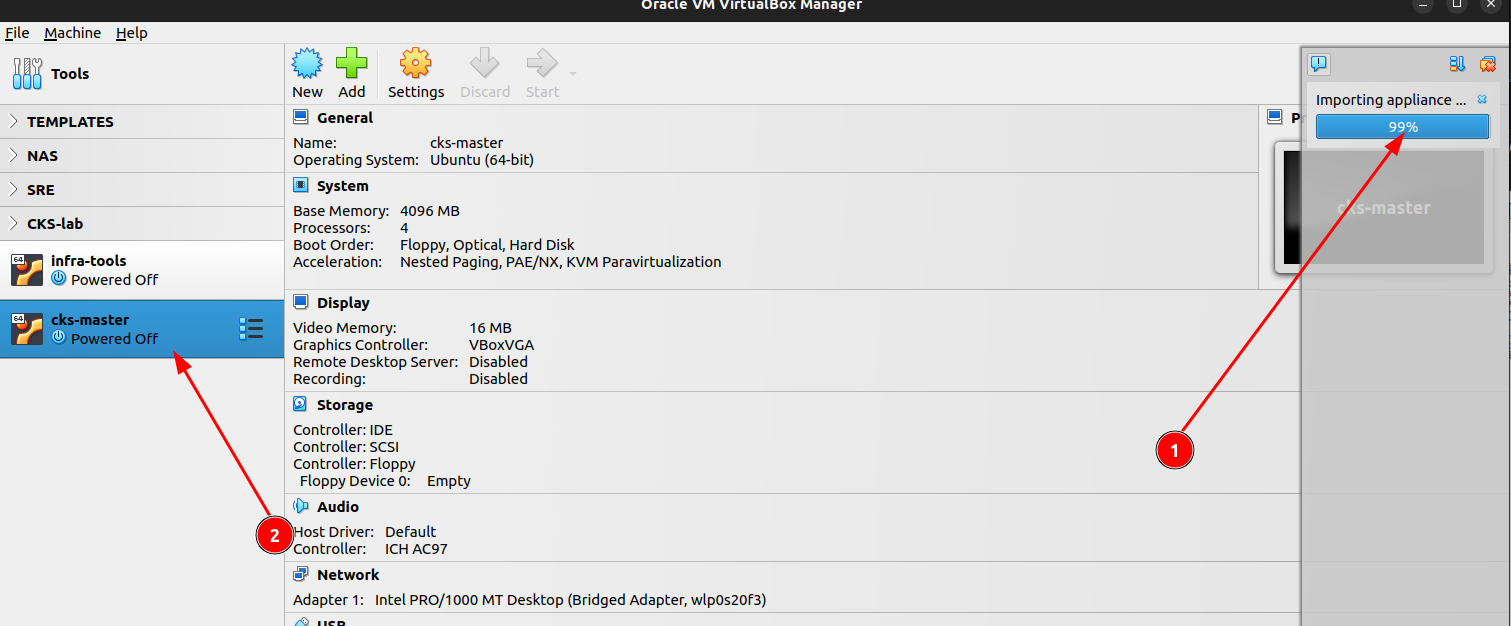
- Wait for import to complete
- Click the VM
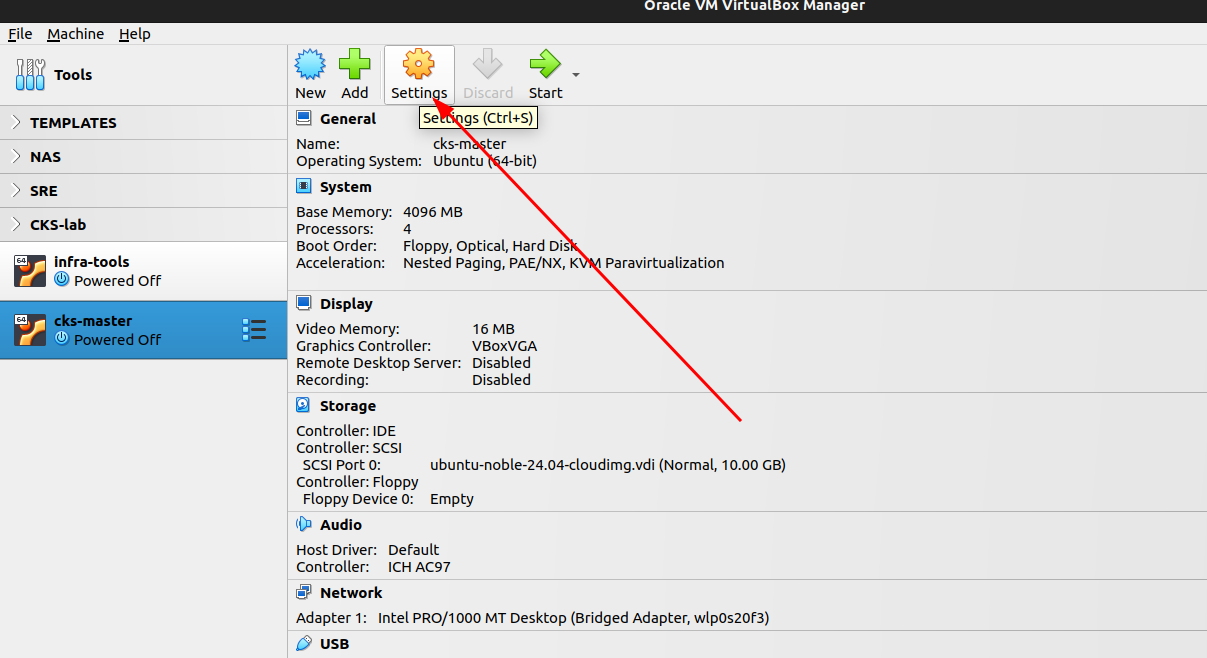

- Go to settings of the VM.
- Add an IDE disk to Storage
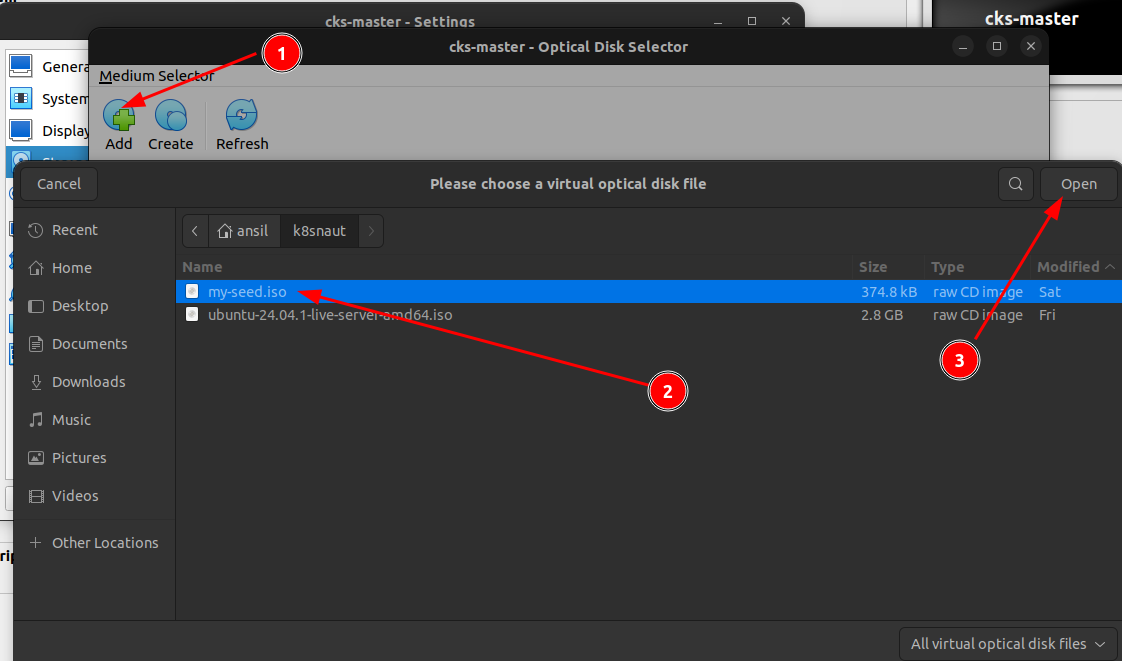
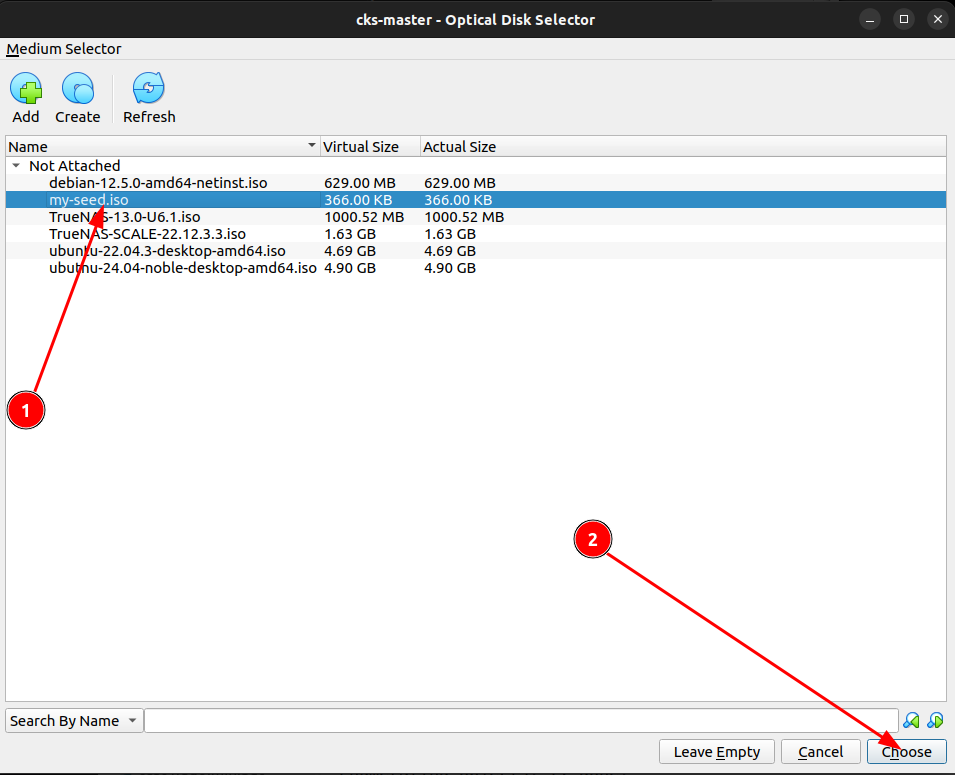
Attach the my-seed.iso to the CDROM
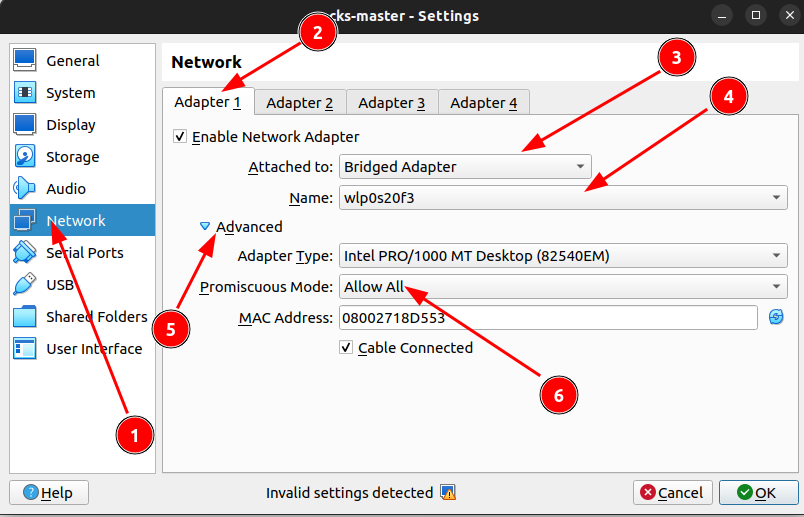
Change the network settings by selecting your Wifi adapter as Bridge device for the VM and enable promiscuous mode.
Repeat the same steps for a worker node
Power-on the VMs and wait for the prompt to set new password
Note:- Password is “ubuntu”
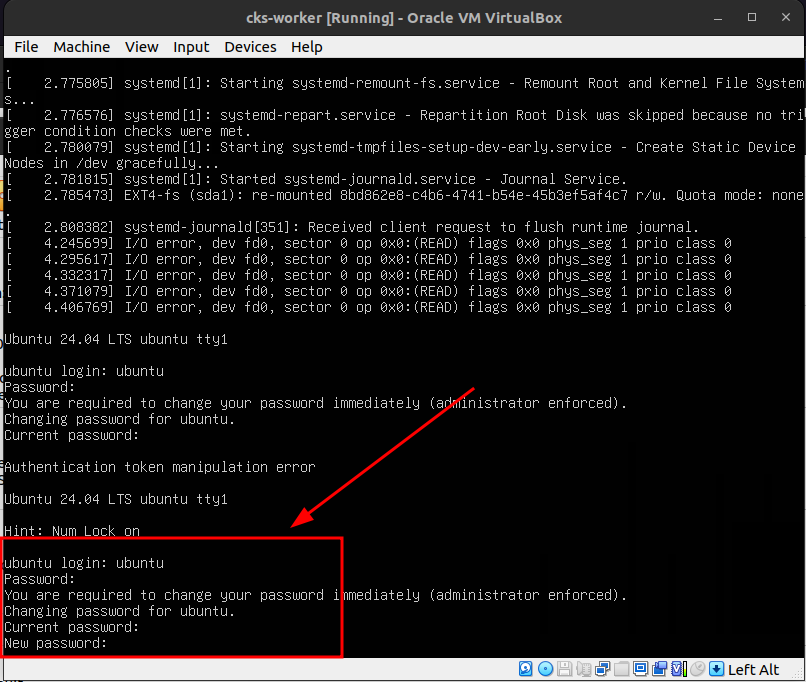
Since you are connected to the same network where wifi is available, IP address will be set on both VMs.
Execute ip a on each VMs to see the IP
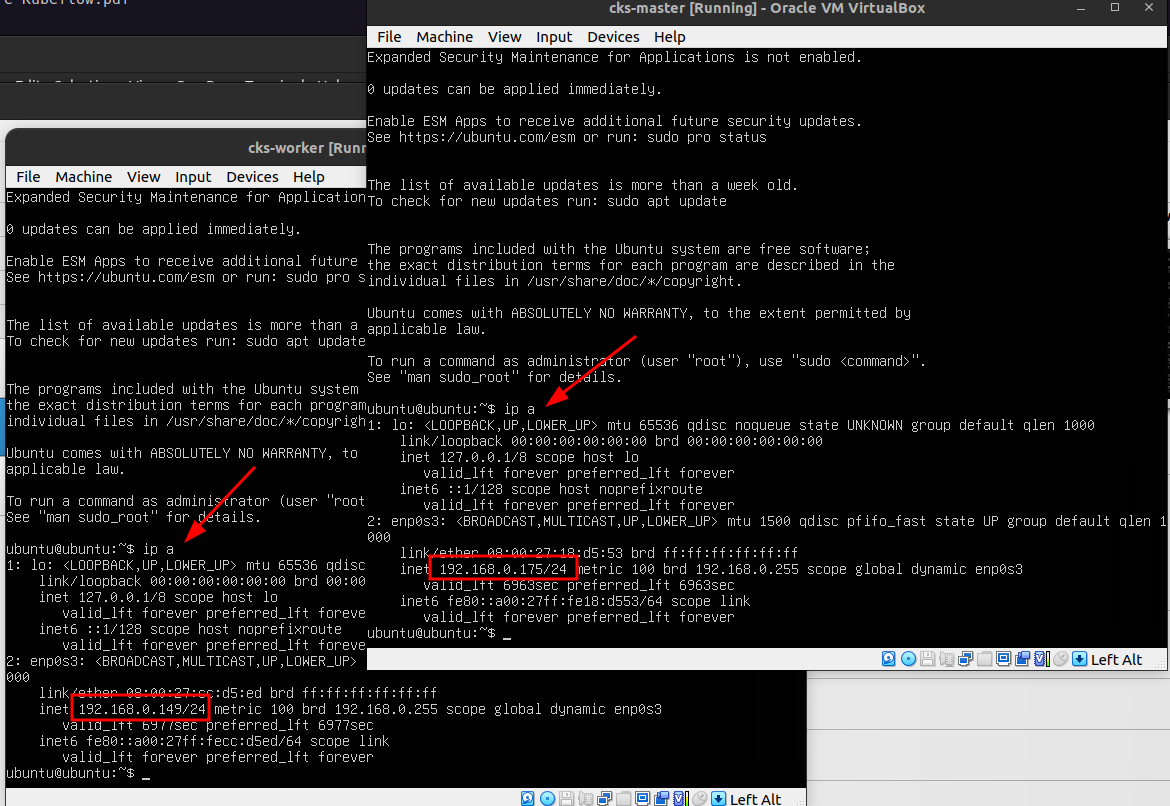
Now you can SSH into the nodes from you local system using the IP and the credentials.
Better setup password-less auth
ssh-copy-id ubuntu@192.168.0.175
ssh-copy-id ubuntu@192.168.0.149
Set hostnames
sudo hostnamectl set-hostname cks-mastersudo hostnamectl set-hostname cks-workerIn this chapter, we will install the container runtime
Install containerd
# Add Docker's official GPG key:
sudo apt-get update
sudo apt-get install ca-certificates curl
sudo install -m 0755 -d /etc/apt/keyrings
sudo curl -fsSL https://download.docker.com/linux/ubuntu/gpg -o /etc/apt/keyrings/docker.asc
sudo chmod a+r /etc/apt/keyrings/docker.asc

# Add the repository to Apt sources:
echo \
"deb [arch=$(dpkg --print-architecture) signed-by=/etc/apt/keyrings/docker.asc] https://download.docker.com/linux/ubuntu \
$(. /etc/os-release && echo "${UBUNTU_CODENAME:-$VERSION_CODENAME}") stable" | \
sudo tee /etc/apt/sources.list.d/docker.list > /dev/null
sudo apt-get update
sudo apt-get install containerd.ioCreate default containerd config file
containerd config default | sudo tee /etc/containerd/config.tomlEnable Cgroup to get support for Cgroup v2
sudo sed -i 's/SystemdCgroup = false/SystemdCgroup = true/' /etc/containerd/config.tomlRestart containerd
sudo systemctl restart containerd
sudo systemctl status containerd
Output:-
● containerd.service - containerd container runtime
    Loaded: loaded (/usr/lib/systemd/system/containerd.service; enabled; preset: enabled)
    Active: active (running) since Wed 2025-02-05 21:47:38 UTC; 32s ago
    Docs: https://containerd.io
    Process: 2555 ExecStartPre=/sbin/modprobe overlay (code=exited, status=0/SUCCESS)
Main PID: 2558 (containerd)
    Tasks: 9
    Memory: 13.6M (peak: 14.1M)
        CPU: 162ms
    CGroup: /system.slice/containerd.service
            └─2558 /usr/bin/containerd

Feb 05 21:47:38 cks-master containerd[2558]: time="2025-02-05T21:47:38.695180848Z" level=info msg="Start subscribing containerd event"
Feb 05 21:47:38 cks-master containerd[2558]: time="2025-02-05T21:47:38.695912510Z" level=info msg="Start recovering state"
Feb 05 21:47:38 cks-master containerd[2558]: time="2025-02-05T21:47:38.696006958Z" level=info msg="Start event monitor"
Feb 05 21:47:38 cks-master containerd[2558]: time="2025-02-05T21:47:38.696017639Z" level=info msg="Start snapshots syncer"
Feb 05 21:47:38 cks-master containerd[2558]: time="2025-02-05T21:47:38.696025262Z" level=info msg="Start cni network conf syncer for default"
Feb 05 21:47:38 cks-master containerd[2558]: time="2025-02-05T21:47:38.696035741Z" level=info msg="Start streaming server"
Feb 05 21:47:38 cks-master containerd[2558]: time="2025-02-05T21:47:38.696123579Z" level=info msg=serving... address=/run/containerd/containerd.sock.ttrpc
Feb 05 21:47:38 cks-master containerd[2558]: time="2025-02-05T21:47:38.696159432Z" level=info msg=serving... address=/run/containerd/containerd.sock
Feb 05 21:47:38 cks-master containerd[2558]: time="2025-02-05T21:47:38.696201277Z" level=info msg="containerd successfully booted in 0.021733s"
Feb 05 21:47:38 cks-master systemd[1]: Started containerd.service - containerd container runtime.
Enable packet forwarding
# sysctl params required by setup, params persist across reboots
cat <<EOF | sudo tee /etc/sysctl.d/k8s.conf
net.ipv4.ip_forward = 1
EOF

# Apply sysctl params without reboot
sudo sysctl --system In this chapter, we will install and configure kubeadm, kubelet and kubectl
These instructions are for Kubernetes v1.31.
Install curl
sudo apt-get update
# apt-transport-https may be a dummy package; if so, you can skip that package
sudo apt-get install -y apt-transport-https ca-certificates curl gpg
Install keys needed for k8s packages
curl -fsSL https://pkgs.k8s.io/core:/stable:/v1.31/deb/Release.key | sudo gpg --dearmor -o /etc/apt/keyrings/kubernetes-apt-keyring.gpgAdd the appropriate Kubernetes apt repository
# This overwrites any existing configuration in /etc/apt/sources.list.d/kubernetes.list
echo 'deb [signed-by=/etc/apt/keyrings/kubernetes-apt-keyring.gpg] https://pkgs.k8s.io/core:/stable:/v1.31/deb/ /' | sudo tee /etc/apt/sources.list.d/kubernetes.list
Update the apt package index, install kubelet, kubeadm and kubectl, and pin their version:
sudo apt-get update
sudo apt-get install -y kubelet kubeadm kubectl
sudo apt-mark hold kubelet kubeadm kubectl
Enable kubelet
sudo systemctl enable --now kubeletIn this chapter, we will initialize the master node and then will add the worker to the cluster
Logon to the master node and follow along
sudo kubeadm init --ignore-preflight-errors=NumCPU --pod-network-cidr 10.0.0.0/16I0205 22:31:24.915138 4255 version.go:261] remote version is much newer: v1.32.1; falling back to: stable-1.31
[init] Using Kubernetes version: v1.31.5
[preflight] Running pre-flight checks
[preflight] Pulling images required for setting up a Kubernetes cluster
[preflight] This might take a minute or two, depending on the speed of your internet connection
[preflight] You can also perform this action beforehand using 'kubeadm config images pull'
W0205 22:31:25.854623 4255 checks.go:846] detected that the sandbox image "registry.k8s.io/pause:3.8" of the container runtime is inconsistent with that used by kubeadm.It is recommended to use "registry.k8s.io/pause:3.10" as the CRI sandbox image.
[certs] Using certificateDir folder "/etc/kubernetes/pki"
[certs] Generating "ca" certificate and key
[certs] Generating "apiserver" certificate and key
[certs] apiserver serving cert is signed for DNS names [cks-master kubernetes kubernetes.default kubernetes.default.svc kubernetes.default.svc.cluster.local] and IPs [10.96.0.1 192.168.0.175]
[certs] Generating "apiserver-kubelet-client" certificate and key
[certs] Generating "front-proxy-ca" certificate and key
[certs] Generating "front-proxy-client" certificate and key
[certs] Generating "etcd/ca" certificate and key
[certs] Generating "etcd/server" certificate and key
[certs] etcd/server serving cert is signed for DNS names [cks-master localhost] and IPs [192.168.0.175 127.0.0.1 ::1]
[certs] Generating "etcd/peer" certificate and key
[certs] etcd/peer serving cert is signed for DNS names [cks-master localhost] and IPs [192.168.0.175 127.0.0.1 ::1]
[certs] Generating "etcd/healthcheck-client" certificate and key
[certs] Generating "apiserver-etcd-client" certificate and key
[certs] Generating "sa" key and public key
[kubeconfig] Using kubeconfig folder "/etc/kubernetes"
[kubeconfig] Writing "admin.conf" kubeconfig file
[kubeconfig] Writing "super-admin.conf" kubeconfig file
[kubeconfig] Writing "kubelet.conf" kubeconfig file
[kubeconfig] Writing "controller-manager.conf" kubeconfig file
[kubeconfig] Writing "scheduler.conf" kubeconfig file
[etcd] Creating static Pod manifest for local etcd in "/etc/kubernetes/manifests"
[control-plane] Using manifest folder "/etc/kubernetes/manifests"
[control-plane] Creating static Pod manifest for "kube-apiserver"
[control-plane] Creating static Pod manifest for "kube-controller-manager"
[control-plane] Creating static Pod manifest for "kube-scheduler"
[kubelet-start] Writing kubelet environment file with flags to file "/var/lib/kubelet/kubeadm-flags.env"
[kubelet-start] Writing kubelet configuration to file "/var/lib/kubelet/config.yaml"
[kubelet-start] Starting the kubelet
[wait-control-plane] Waiting for the kubelet to boot up the control plane as static Pods from directory "/etc/kubernetes/manifests"
[kubelet-check] Waiting for a healthy kubelet at http://127.0.0.1:10248/healthz. This can take up to 4m0s
[kubelet-check] The kubelet is healthy after 1.004888923s
[api-check] Waiting for a healthy API server. This can take up to 4m0s
[api-check] The API server is healthy after 8.502467445s
[upload-config] Storing the configuration used in ConfigMap "kubeadm-config" in the "kube-system" Namespace
[kubelet] Creating a ConfigMap "kubelet-config" in namespace kube-system with the configuration for the kubelets in the cluster
[upload-certs] Skipping phase. Please see --upload-certs
[mark-control-plane] Marking the node cks-master as control-plane by adding the labels: [node-role.kubernetes.io/control-plane node.kubernetes.io/exclude-from-external-load-balancers]
[mark-control-plane] Marking the node cks-master as control-plane by adding the taints [node-role.kubernetes.io/control-plane:NoSchedule]
[bootstrap-token] Using token: zcn9eo.k3bc7xk2hoz2k37h
[bootstrap-token] Configuring bootstrap tokens, cluster-info ConfigMap, RBAC Roles
[bootstrap-token] Configured RBAC rules to allow Node Bootstrap tokens to get nodes
[bootstrap-token] Configured RBAC rules to allow Node Bootstrap tokens to post CSRs in order for nodes to get long term certificate credentials
[bootstrap-token] Configured RBAC rules to allow the csrapprover controller automatically approve CSRs from a Node Bootstrap Token
[bootstrap-token] Configured RBAC rules to allow certificate rotation for all node client certificates in the cluster
[bootstrap-token] Creating the "cluster-info" ConfigMap in the "kube-public" namespace
[kubelet-finalize] Updating "/etc/kubernetes/kubelet.conf" to point to a rotatable kubelet client certificate and key
[addons] Applied essential addon: CoreDNS
[addons] Applied essential addon: kube-proxy
Your Kubernetes control-plane has initialized successfully!
To start using your cluster, you need to run the following as a regular user:
mkdir -p $HOME/.kube
sudo cp -i /etc/kubernetes/admin.conf $HOME/.kube/config
sudo chown $(id -u):$(id -g) $HOME/.kube/config
Alternatively, if you are the root user, you can run:
export KUBECONFIG=/etc/kubernetes/admin.conf
You should now deploy a pod network to the cluster.
Run "kubectl apply -f [podnetwork].yaml" with one of the options listed at:
https://kubernetes.io/docs/concepts/cluster-administration/addons/
Then you can join any number of worker nodes by running the following on each as root:
kubeadm join 192.168.0.175:6443 --token zcn9eo.k3bc7xk2hoz2k37h \
--discovery-token-ca-cert-hash sha256:9a5c622b76b969b6ebe1f80ac903f738237625c7a0375a707466dbe6e724d261 Now logon to the worker node and execute the join command from the output
sudo kubeadm join 192.168.0.175:6443 --token zcn9eo.k3bc7xk2hoz2k37h \
    --discovery-token-ca-cert-hash sha256:9a5c622b76b969b6ebe1f80ac903f738237625c7a0375a707466dbe6e724d261
Verify nodes
mkdir -p $HOME/.kube
sudo cp -i /etc/kubernetes/admin.conf $HOME/.kube/config
sudo chown $(id -u):$(id -g) $HOME/.kube/config
kubectl get nodes
Output: -
ubuntu@cks-master:~$ kubectl get nodes
NAME         STATUS     ROLES           AGE     VERSION
cks-master   NotReady   control-plane   2m23s   v1.31.5
cks-worker   NotReady   <none>          90s     v1.31.5
The nodes are in NotReady state because we didn’t install CNI.
In the next chapter, we will install Cilium CNI. Stay tuned!
In this chapter, we will deploy Cilium CNI
You need to execute these steps only from master node
Download the cilium CLI
CILIUM_CLI_VERSION=$(curl -s https://raw.githubusercontent.com/cilium/cilium-cli/main/stable.txt)
CLI_ARCH=amd64
if [ "$(uname -m)" = "aarch64" ]; then CLI_ARCH=arm64; fi
curl -L --fail --remote-name-all https://github.com/cilium/cilium-cli/releases/download/${CILIUM_CLI_VERSION}/cilium-linux-${CLI_ARCH}.tar.gz{,.sha256sum}
sha256sum --check cilium-linux-${CLI_ARCH}.tar.gz.sha256sum
sudo tar xzvfC cilium-linux-${CLI_ARCH}.tar.gz /usr/local/bin
rm cilium-linux-${CLI_ARCH}.tar.gz{,.sha256sum}
Deploy CNI
cilium install --version 1.17.0Check the deployment status (It may take 10-15mins depends on your internet speed)
cilium status --waitOnce deployment completes the output will show all in good shape like below.
    /¯¯\
 /¯¯\__/¯¯\    Cilium:             OK
 \__/¯¯\__/    Operator:           OK
 /¯¯\__/¯¯\    Envoy DaemonSet:    OK
 \__/¯¯\__/    Hubble Relay:       disabled
    \__/       ClusterMesh:        disabled

DaemonSet              cilium             Desired: 2, Ready: 2/2, Available: 2/2
DaemonSet              cilium-envoy       Desired: 2, Ready: 2/2, Available: 2/2
Deployment             cilium-operator    Desired: 1, Ready: 1/1, Available: 1/1
Containers:            cilium             Running: 2
                    cilium-envoy       Running: 2
                    cilium-operator    Running: 1
Cluster Pods:          2/2 managed by Cilium
Helm chart version:    1.17.0
Image versions         cilium             quay.io/cilium/cilium:v1.17.0@sha256:51f21bdd003c3975b5aaaf41bd21aee23cc08f44efaa27effc91c621bc9d8b1d: 2
                    cilium-envoy       quay.io/cilium/cilium-envoy:v1.31.5-1737535524-fe8efeb16a7d233bffd05af9ea53599340d3f18e@sha256:57a3aa6355a3223da360395e3a109802867ff635cb852aa0afe03ec7bf04e545: 2
                    cilium-operator    quay.io/cilium/operator-generic:v1.17.0@sha256:1ce5a5a287166fc70b6a5ced3990aaa442496242d1d4930b5a3125e44cccdca8: 1
Delete the cilium operator to cleanup transient errors that may get flagged during test
kubectl delete pods -n kube-system -l name=cilium-operatorYou can run a connectivity test to verify the kubernetes network health
cilium connectivity testAfter a while, you should see below output
...
ℹ️  Single-node environment detected, enabling single-node connectivity test
ℹ️  Monitor aggregation detected, will skip some flow validation steps
⌛ [kubernetes] Waiting for deployment cilium-test-1/client to become ready...
⌛ [kubernetes] Waiting for deployment cilium-test-1/client2 to become ready...
⌛ [kubernetes] Waiting for deployment cilium-test-1/echo-same-node to become ready...
⌛ [kubernetes] Waiting for pod cilium-test-1/client-b65598b6f-n99h7 to reach DNS server on cilium-test-1/echo-same-node-5c4dc4674d-7vtmj pod...
⌛ [kubernetes] Waiting for pod cilium-test-1/client2-84576868b4-6xjp5 to reach DNS server on cilium-test-1/echo-same-node-5c4dc4674d-7vtmj pod...
⌛ [kubernetes] Waiting for pod cilium-test-1/client-b65598b6f-n99h7 to reach default/kubernetes service...
⌛ [kubernetes] Waiting for pod cilium-test-1/client2-84576868b4-6xjp5 to reach default/kubernetes service...
⌛ [kubernetes] Waiting for Service cilium-test-1/echo-same-node to become ready...
⌛ [kubernetes] Waiting for Service cilium-test-1/echo-same-node to be synchronized by Cilium pod kube-system/cilium-vlnmr
⌛ [kubernetes] Waiting for NodePort 192.168.0.175:32072 (cilium-test-1/echo-same-node) to become ready...
⌛ [kubernetes] Waiting for NodePort 192.168.0.149:32072 (cilium-test-1/echo-same-node) to become ready...
..............
.. redacted..
..............
✅ [cilium-test-1] All 66 tests (275 actions) successful, 44 tests skipped, 1 scenarios skipped.
Now cluster is ready!
ubuntu@cks-master:~$ kubectl get nodes
NAME         STATUS   ROLES           AGE   VERSION
cks-master   Ready    control-plane   32m   v1.31.5
cks-worker   Ready    <none>          31m   v1.31.5
ubuntu@cks-master:~$
Congratulations on setting up your cluster! Now we can start practicing our topics. See you there.